


RecovR: Vehicle Theft Recovery
3.668.00 Reviews
App Specs
- Version
- 1.73.0
- Updated On
- License
- Free
- Downloads
- 50,000+
- Developer
- RecovR
- Categories
- Auto & Vehicles
- Platform
- Android
Screenshots
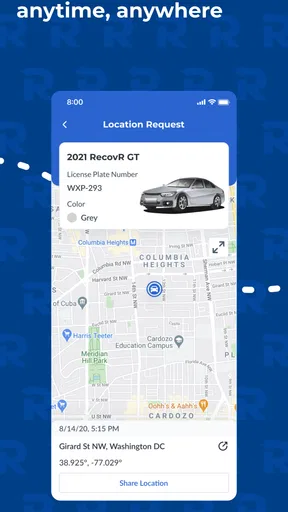
 Analysis by AppCompare
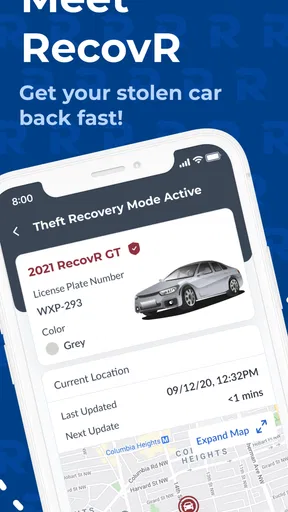
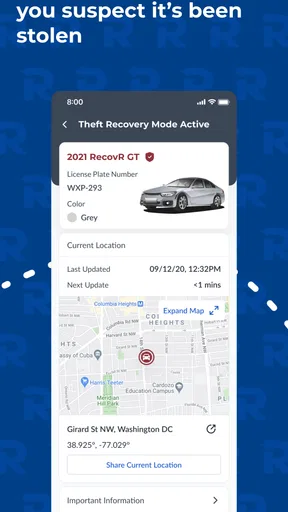
Keeping track of a vehicle is one of those jobs I would rather make automatic than remember during a stressful moment. RecovR: Vehicle Theft Recovery is built for a specific situation: it works with a RecovR locator installed in a car, helping the owner locate the vehicle and support theft recovery. That focus is important, because this is not a general driving assistant, a fuel tracker, or a replacement for every kind of roadside service.
I reviewed it as an Auto & Vehicles app from RecovR, and my first impression is that its usefulness depends less on the app alone than on whether your car already has the matching locator. If you have that hardware, the application gives the tracking side of the setup a practical place to live on your phone. If you do not, downloading it by itself is unlikely to turn an ordinary car into a connected vehicle.
The app is free to install and is rated for Everyone, which makes the initial commitment fairly low. It has a 3.6 average from around a hundred ratings and has passed the fifty-thousand-install mark. Those figures suggest a real user base, but they also tell me to approach it as a focused tool rather than a universally polished must-have. My recommendation is therefore conditional: it can be worthwhile for a RecovR-equipped vehicle, while it is an easy skip for someone looking only for a standalone locator app.
How the free app creates value when the locator is already in your car
I see the free app as the phone-based part of a larger setup, rather than a complete tracking solution by itself. When the RecovR locator is already installed in your car, the app gives you a place to check its location and practice the steps you may need later. That makes preparation—not just downloading—the useful next step, and it leads naturally to how I’d fit it into a household routine.
The cost question is simpler than the ownership question
The app itself is free, so there is no purchase price inside the basic decision of whether to download it. That is the clearest verified cost advantage. However, “free” should not be confused with a complete theft-recovery system at no cost. The application is designed for cars with a RecovR locator, so the meaningful financial decision is tied to having access to that compatible device and its wider setup.
I would look at the app as the phone-facing part of a vehicle protection arrangement. That distinction prevents a common mistake: installing it first and expecting the software to provide location information without the associated locator. The free download is useful when it connects you to equipment you already have or are specifically planning to use. It is not, on its own, a substitute for a hardware tracker.
Because the app is free, it is reasonable to install it before committing your daily routine to it, provided you understand that the locator is central. You can assess whether the interface feels comfortable, whether the account setup suits your household, and whether the location workflow makes sense to you. I would still avoid treating the download as proof that every tracking capability is available without the vehicle hardware.
Worth Reading Before You Choose

EA SPORTS FC Mobile 26 Is a Bigger Football Game, but It Takes Time

Flipboard Shows What News Apps Must Do Beyond the Feed

Switching to Android Auto Means Rethinking Your Driving Routine

Google Calendar Makes a Crowded Week Easier to Manage

Ludo King Makes the Most of the Minutes Between Plans

Baby Panda World Brings Quick Play to Modern Phones, but Its Game Library Feels Busy
What I would use it for in ordinary life
The obvious use is theft recovery, but the locator-and-app combination can also help with the less dramatic problem of forgetting where the car is. Imagine leaving a vehicle in a large station car park after a long trip. Rather than relying entirely on memory, the app can serve as the place to begin checking the vehicle’s location, assuming the locator is active and communicating as intended.
That does not mean I would use it as a live navigation companion while driving. Its value is in finding or identifying the vehicle, not in replacing a dedicated map application. I would also avoid opening it repeatedly just to watch a parked car out of curiosity. A tracking tool is most useful when it supports a clear action: confirming where the car was left, checking an unexpected location, or giving relevant information to the people handling a theft report.
One practical habit I would recommend is setting up the app before an emergency. Learn where the vehicle appears, confirm that you can identify the correct car, and make sure the people who may need access know who is responsible for the account. In a stressful situation, a familiar workflow is more valuable than discovering the interface for the first time.
Why the dedicated focus can be better than a general car app
Many automotive applications concentrate on fuel consumption, maintenance reminders, insurance documents, parking payments, or route planning. Those tools may be more useful for everyday driving, but they are not designed around the same recovery problem. RecovR’s narrow purpose is its main strength: it keeps the vehicle-location task separate from the clutter of a broader motoring dashboard.
Compared with a Bluetooth key finder, the intended setup is more appropriate for a whole vehicle because it is built around a RecovR locator rather than a small tag attached to keys. Compared with a phone-only location history, it is aimed at the car itself instead of assuming the driver’s phone stayed inside or near the vehicle. Those differences matter when the vehicle is moved without the owner.
At the same time, a dedicated system is not automatically better for every owner. Someone who only misplaces keys may need a simpler and cheaper tag-based solution. Someone wanting remote commands, maintenance data, or a complete connected-car dashboard may prefer a manufacturer application or another automotive platform that covers those areas. I see this app as a specialist tool, not a universal replacement.
Small workflow decisions that make a difference
The first non-obvious tip is to treat vehicle identification as part of setup, not as an emergency detail. If a household has more than one car or more than one person using the account, establish a clear naming habit so that a location result cannot be confused with another vehicle. The app’s usefulness drops sharply if the owner is uncertain about which entry represents the car involved.
The second is to separate “the car is not where I expected” from “the car has been stolen.” A parking-memory mistake may call for checking the last known place and retracing the route. A suspected theft is more serious and should be handled promptly through the appropriate authorities and recovery process. The application can assist with location information, but I would not treat a map screen as permission to confront anyone or recover the vehicle personally.
The third is to keep the app as part of an emergency checklist rather than the entire checklist. I would store the vehicle’s identifying details separately, know who to contact, and keep the phone charged when travelling or parking away from home. A locator is most helpful when its information can be combined with accurate vehicle details and calm communication.
What the current release tells me
The current version is 1.73.0, and the app supports Android 9 or later. That makes the operating-system requirement relatively accessible for many existing phones, but it is still worth checking an older spare device before relying on it. A phone that cannot run the application is not a useful backup during a recovery incident.
The application was released on April 18, 2021, so it has had time to establish a presence rather than appearing as a brand-new experiment. Still, the 3.6 average indicates that I would not assume every user has had a friction-free experience. Ratings at that level often encourage a more careful installation: update the app, test the normal workflow, and avoid waiting for a crisis to discover an account or device issue.
I also appreciate that the Everyone age rating keeps the app broadly approachable. In practice, though, the responsible user is usually the vehicle owner or an authorized driver. A family can decide who should receive location access and who should handle a recovery call. The age label describes the app’s content, not the legal or practical responsibility involved in tracking a vehicle.
Where the tradeoffs become clear
The largest tradeoff is dependence on compatible hardware. The software can be free and still be a poor value for someone who has no RecovR locator and does not want a hardware-based system. This is the point I would emphasize to a friend: do not judge the app’s value from the download price alone. Judge whether the complete setup solves a problem you genuinely have.
Another limitation is specialization. If you want one application for service schedules, fuel records, navigation, parking, and theft recovery, this is unlikely to be the most complete choice. Its focused design may feel clean to one driver and incomplete to another. I prefer that honesty over pretending a recovery app should also be the center of every driving task.
There is also a human tradeoff. Location information can reduce uncertainty, but it can also tempt an owner to check too often or act impulsively when a vehicle appears somewhere unexpected. I would use the app to gather useful information and then follow a sensible recovery procedure, not to turn a location result into a confrontation.
Finally, the rating means I would keep expectations measured around polish and reliability. I cannot recommend it as a flawless experience. The right way to evaluate it is through a controlled test: open the app, confirm that the vehicle is represented correctly, learn the location workflow, and decide whether that process feels dependable enough for your needs. If the setup is confusing before anything goes wrong, choose another solution rather than hoping stress will make it easier.
Who is most likely to get good value
I think the best fit is a driver who already has a RecovR locator, owns a compatible Android phone, and wants a dedicated way to locate a vehicle. It also makes sense for households where several people share a car and need a consistent recovery reference. For those users, the free app can add practical access to the locator without forcing them into a general-purpose automotive application.
It may also suit someone who parks in unfamiliar places often and values a vehicle-focused location workflow. The benefit is not that it eliminates every parking problem, but that it gives the owner a defined tool for checking the car’s whereabouts. That is more targeted than relying on a phone’s memory, a photograph of a parking row, or a key finder that was never intended to track a vehicle.
I would be more cautious recommending it to a person who wants protection without buying or using dedicated hardware. That user should compare complete alternatives, including the total cost and the type of support they expect, rather than choosing an app because the store download is free. I would also point frequent travellers toward testing the setup in advance, especially if their phone is close to the minimum supported operating system.
For a person seeking broad connected-car controls, this is probably not the right first choice. A manufacturer’s app may be better when the priority is remote vehicle functions or service information. For simple item finding, a small tag may be more convenient. For theft recovery specifically, however, a vehicle-oriented locator arrangement is more relevant than either of those alternatives.
My final recommendation
I would recommend RecovR to a friend in one sentence: install it if you have, or are deliberately adopting, the matching RecovR locator and want a focused vehicle-location tool; skip it if you are looking for a standalone app that can track an unequipped car.
The free price makes trying the software low-risk, but the real value comes from the complete hardware relationship, not from the app in isolation. I like its clear purpose and the way it can support a practical recovery routine, especially when the owner prepares the account and learns the workflow before an emergency. I do not like the dependence on a specific locator, the limited scope compared with broader automotive apps, or the fact that the modest average rating advises realistic expectations.
My verdict is therefore positive but selective. For the right vehicle and owner, it can be a useful layer of reassurance and a sensible place to start when a car’s location matters. For everyone else, the free download is not enough reason to keep it. The best value appears when the app is treated as part of a tested recovery plan, not as a magic replacement for a vehicle locator, responsible reporting, or common sense.
Pros
- Guides users through recovery steps after a vehicle theft.
- Stores important vehicle details for quicker reporting.
- May help organize documents
- contacts
- and case information.
- Provides practical reminders during a stressful recovery process.
- Focused design makes essential recovery tools easy to find.
Cons
- Useful features may depend on location and local law enforcement support.
- Users must keep vehicle and contact information accurate and updated.
- Some recovery tools may require an account or personal data sharing.
- The app cannot guarantee that a stolen vehicle will be recovered.
- Limited value for users without a compatible tracking or recovery service.
FAQs for RecovR: Vehicle Theft Recovery
What is RecovR: Vehicle Theft Recovery and how does it work?
RecovR: Vehicle Theft Recovery is designed to help vehicle owners locate and recover a car if it is stolen. The service generally works with a dedicated tracking device installed in the vehicle and a companion mobile app. After setup, the app can display the vehicle’s reported location and provide recovery-related information, although performance depends on the device, cellular coverage, GPS availability, and an active service plan.
Does RecovR require a separate tracking device or subscription?
Yes, users should check the current equipment and service requirements before downloading the app. RecovR is not normally a standalone application that can locate any vehicle using only a phone. It is intended to work with compatible RecovR hardware and an associated account or subscription. Pricing, activation fees, included features, and eligibility may vary, so confirm these details with the provider or participating dealer before purchasing or installing the system.
Can RecovR track my vehicle in real time?
RecovR may provide location updates for a properly installed and connected tracking device, but users should not assume that the map always shows a perfectly live position. Update frequency can be affected by cellular reception, GPS conditions, underground parking, buildings, weather, battery or power issues, and the device’s operating mode. The app is best considered a recovery aid rather than a guaranteed, uninterrupted real-time tracking system.
What should I do if my vehicle is stolen while using RecovR?
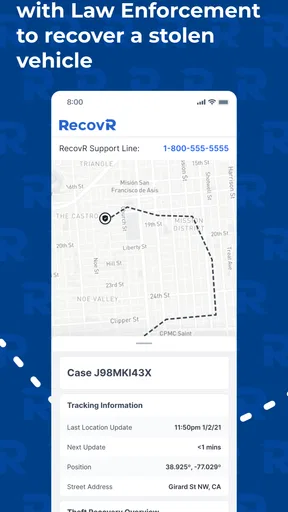
If your vehicle is stolen, contact law enforcement immediately and provide the vehicle details, device information, and any location data shown in the app. Do not attempt to recover the vehicle yourself or confront anyone based on a map location. RecovR’s information may help authorities with their investigation, but the app cannot replace an official police report, insurance notification, or the recovery procedures required by your insurer and local authorities.
Is RecovR compatible with every Android or iPhone device and every vehicle?
Compatibility should be verified before downloading or activating the service. The app may require a supported version of Android or iOS, an internet connection, location permissions, and a compatible RecovR tracking unit. Vehicle installation and availability can also depend on the participating dealer, vehicle type, electrical system, and service region. Review the latest requirements in the official app listing or contact RecovR support if your phone or vehicle is older.


